Raspbery Pi’s RP2040 (Pico) and RP2350 (Pico 2) family of chips/boards are rather interesting choices for DIY flight controllers would it be for education, thus connecting or soldering by hand, or low quantity PCB production:
- cheap (~1 Eur per chip, 5-10 Eur per board)
- popular, easy to source chips and prototyping boards
- W versions even have WIFI
- the chips are easy to integrate into custom PCBs as they require low number of external components; there are some existing schematics
Available flight controllers
- Madflight already support both chips/boards, and some common older sensors (only slight modifications to sample code were needed).
- PX4 is interesting being a proper and much more advanced flight controller than Madflight: a proper autopilot, very wide sensor support, mavlink (a communication protocol with ground stations) and many more.
- RP2040: PX4 has partial support out of the box. Read further to hear about my tests.
- RP2350: NuttX which is underlying OS, already have partial support for RP2350 in dev (non-released). Thus supporting it in PX4 flight controller should be if not easy at least doable. That’s what I’ve being attempting now!
- Ardupilot: no support yet, but ChibiOS has some RP2040 support. No PRs for RP2350 yet in ChibiOS. As PX4 test with RP2040 seemed to indicate it’s rather slow I abandoned the idea of exploring Ardupilot support for now.
Testing Pi Pico RP2040
TLDR: It kinda works, but not fully.
With quite minor changes to the code, I was able to make PX4 start and QGroundControl (QGC) was able to connect to it. However, setup was not possible via QGC due to issue with saving the params (manually storing them in the code as defaults would work). So after fiddling for a while I moved on to RP2350.
Pros:
- Existing open-source PCB https://github.com/vxj9800/openFC2040 . Pins are mostly same for RP2350, so PCB could be used with it too!
- code mostly exists in PX4
Cons:
- rather slow
- FC configuration can not be saved (yet). Might be related to slowness too?
- was not able to setup MMC/SDCard yet
Implementing RP2350 support in PX4
Overview
There’s at least two big pieces of work to be done:
- PX4/NuttX: Back porting RP2350 support to PX4 fork of NuttX
- PX4/Autopilot:
- and a new PX4 board
- adding RP2350 chip support, implementing/adapting basic functionality & peripherals support (they are quite low level as FC and OS are quite tightly coupled as there’s no real HAL in NuttX/PX4), that include:
- USB
- PWM outputs
- UART/RCIN (e.g. ELRS)
- ADC (e.g. for voltage and current sensing)
- I2C / SPI
- implementing/testing sensors support
- mavlink
My early experiences
Back-porting NuttX was rather ordinary by cherry-picking the commits from NuttX, with minor modifications.
As for a new-commer to PX4, adding flight controller support turned out to be much more complicated than originally expected:
- menuconfig didn’t work for me, for unclear reasons
- even getting stuff to compile was a minor challenge due to differences how build works
- there’s still some weird issue to figure out regarding SMT
- once the code compilation and linking got finally sorted out (or hacked through to be more exact), I got stuck again.
- Booting up the Pico 2: After loading the uf2 image to Raspberry Pico 2W, it nothing was happening – the board seemed stuck at bootloader level, no LEDs lighting up. First I thought something related to bootloader or linker’s LD scripts was messed up, so I wasted a few hours here and there, which have more motivation to setup another Rasbery Pi as a debugger!
Debugging the RP2350
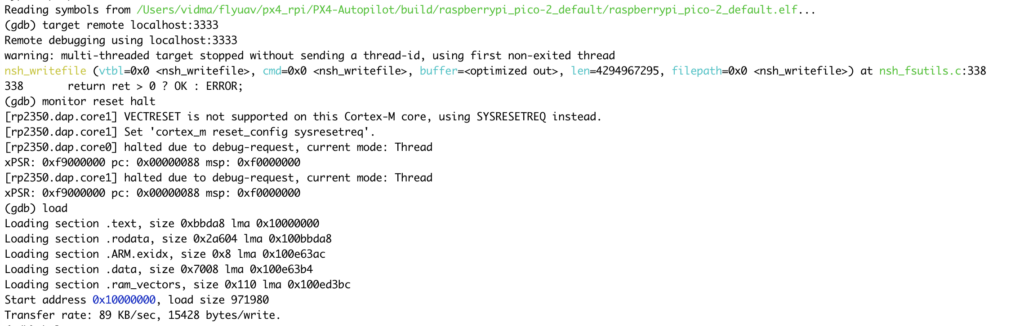
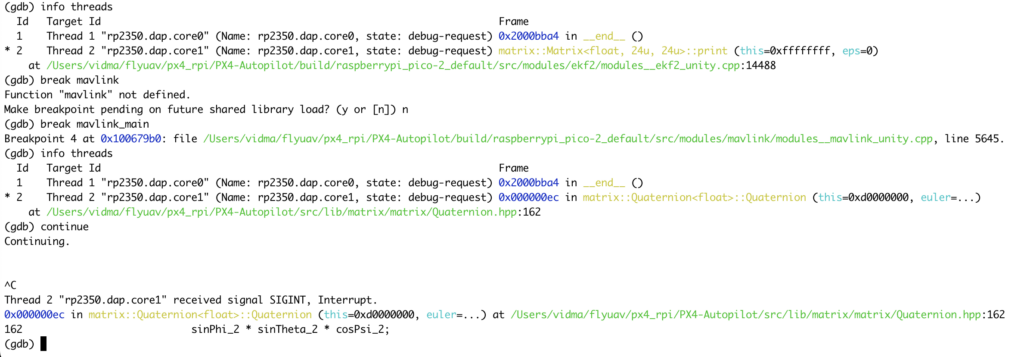
After soldering up another Pi, and setting up and connecting the debugger (“wasted” another few hours on that), I started the gdb, it turned out the PX4 code was actually running already, at least to some extent – so the effort was not totally wasted!
$ arm-none-eabi-gdb build/.../raspberrypi_pico-2_default.elf
to be continued once I perform more debugging…

Leave a Reply